Freshbots: Bot Builder
Overview:
Freddy bots is the new bot builder platform from Freshworks which needs to be primarily integrated with Freshdesk, also function as an independent entity and will be used by SMEs as well as the big companies for the customer engagement tool. It would also be used to create workflows for internal support.


V
s
Process:
Discover
Research Phase
Define
Synthesis Phase
Development
Ideation Phase
Deliver
Implementation Phase
Do know
should be
Don’t know
could be
Converging
Converging
Diverging
Diverging
Ideate
Evaluate 1st
ideas
Define research
areas & methods
Conduct
secondary
research
Set ideas, a
design vision
& hypothesis
Conduct
primary
research
Set ideas, a
design vision
& hypothesis
Answers,
Product,
Solutions
First ideas & vision,
Potential solutions,
Hypothetical answers
Final brief,
HMW questions,
Stategy
Unstructured
research
findings
Build themes & clusters
Prototype, Test & Analyse
Learn, Iterate, Repeat
Build, Iterate, Repeat
Release
Find insights
Deduce opportunity areas
HMW
Questions,
Challenge,
Client brief
User Persona
Key Collaborators :
My Role:
Individual contributor, worked from initiation to the completion of the product including research, interaction and visual design to design validation and final handoff to the developers and business stakeholders.
Other Collaborators:
Design Review:
Design Manager
Product manager:
Developer
Pre sales team members
Customers
Research
Value proposition of the bots
1
Improved customer engagement.
2
Monitoring consumer data & gaining insights.
3
Better lead generation, qualification & nurturing.
4
Easier approach to global markets.
5
Cost savings.
6
Keep up with the trends.
Challenges with existing solutions
Based on interviews with customers and internal users


1
Onboarding is very hard and requires a lot of training.
2
Nomenclature adds a lot of confusion and users fears for the loss of content hence affecting his productivity.
3
Options for prebuilt bot templates.
4
No option to manage multiple bot versions.
5
Linking the flows and dialogs are complicated as well as no way to figure out if the linking based on condition is correct or not.
6
No information on the dashboard to show the performance of the bot.
7
Users should be able to preview bot workflows any point of time while configuration.
8
It's not a DIY Bot and requires an incredible technology learning for configuration so requires a lot of man management to train and modify flows for customers thus decreases the productivity of internal pre-sales team.
9
Doesn’t integrate with existing products of Freshworks.
10
Doesn’t have ability to publish on multiple platforms such as FB messenger, WhatsApp, SMS, etc.
Competitive Evaluation: How we are different from others? What they do better, we don’t.
Attributes
Dialog flow
Landbot
Flow xo
Reply.ai
Onboarding & Discovery
Very complicated onboarding. Bot building is even more complicated. Hard to operate for the users who doesn’t have appropriate technical knowledge.
One of the most premier bot building platforms. Onboarding is very smooth. Upfront provides you with the template to select or can initiate your own bot.
One of the most premier bot building platforms. Onboarding is very smooth. Upfront provides you with the template to select or can initiate your own bot.
Doesn’t let you onboard upfront but only post verification via an agent,
Features
Lots features
Including bot building, API configuration, integrations with multiple platforms as well as google agents, tracking with analytics. Prebuilt bot templates.
Simple bot building experience. However, doesn't let you import content via remote requests nor it provides integration with different platforms.
Manages chatbots to be used on web Messenger, FB Messenger, Slack, Telegram & Twillio.
Manages conversations across various social messaging platforms.. Take over the conversation at any moment from Reply.ai, Zendesk, LiveChat, Bright Pattern, FreshDesk or ZipWhip.
From Card Sorting/ Participatory Research

Persona: Who are we designing for?
About Seema
Seema is a young and dynamic product manager of a popular cinema chain with 5 years of experience.
Goals & Responsibilities:
1
Configure and manage bots for cinema chain.
2
Coordinate with devs and integrate the APIs.
3
Track the performance of the bots.
4
Make bot available for end customers
5
Bot configured for all products.
6
Reuse content
Seema Kapoor
Software Engg.

Age: 28 • Gender: Female
Education: Engineering graduate
Motivations:
1
Easy approach to ticket booking.
2
Increase online booking and thus increase in revenue.
3
Incentives
4
Growth
Challenges:
1
Bot building is a pain, requires a lot of coding and is not a “Do it yourself experience”.
2
Can’t add multiple conditions and group them.
3
Should be able to reuse content and test APIs.
4
Manage multiple bot versions.
5
Configuring content for API calls.
Empathy Map: What do they say, thinks, feels and does?
Think & Feel
1
Have to make the bot workflow.
2
Is there a automated way of configuring content.
3
Content should be customer centric.
4
Nomenclatures very complicated.
5
Wants to reach out to her home on time.
6
How to test the bot content configuration.
See
1
Complicated & cluttered bot flows
2
Complicated nomenclatures
3
Video feeds.
4
Live visitors

Hear
1
Requests from marketing teams for customers.
2
Requests from product team.
3
Requests from development team.
4
Request from leadership.
Say & do
1
How to add new workflow.
2
Easy API configuration.
3
Create multiple bot flows.
4
Add new dialog.
5
Codeless configuration.
6
Connect bot flows and dialogs.
Mind Map: How do they understand the universe

Visual Design
Design Iterations
Basis the tight timelines, we did an immediate release with introduction of left nav and creating a design system to make the design and experience consistent.
New Bot Design
Interactions for landing page

The journey starts from Freshdesk admin screen.
User can configure the chatbot for themselves and assign agents.
Each user will be allocated a fresh id# which would let them own a bot piece.
The journey starts from Freshdesk admin screen.
User can configure the chatbot for themselves and assign agents.
Each user will be allocated a fresh id# which would let them own a bot piece.
Once they land upon the Freshbots screen landing screen, they would see appropriate bot templates from which they can choose one or create a new bot.
A preview for the prebuilt bots can be seen so that admins can get a gist of content they can expect from the bots.


All users need to do is name the bot and choose the platform to publish (website being the default selection).
Bot configuration landing page

Interactions for Bot builder page
User will land on the Bot builder page with the First (Welcome Message) conversation prefilled (based upon the Bot name).
User can opt to edit the content by clicking on the conversation bubble or Click on “Add New Conversation” to add/ configure new message or question.
“1.0” is signifies Flow number and subsequent conversations within the flow will be represented as “1.1, 1.2” & so on.
A conversation consists of
Content (Message/ Question) & Answer.
Actions (Follow up or intermittent activities).
Conditions (Logic) & Path (Next Steps).
User can make an informed decision if he/ she wishes to add a message or question (always followed by an answer).


User makes an informed choice about the format of the answer.
Button
Dropdown
Carousel
Textfield
Content List
Ratings
For the limited number (6 options) of options, admin could choose button as the answer format.
User enters the value to configure the options.


Conversation added with the options to select for the users in a button format.
Forkout a flow by clicking on the “+” icon.
Select from existing flow or add new flow.


Select from existing flow or add new flow.
Forked into a new flow.

Conversation list with answer for a question defined for a button format with forked out flow
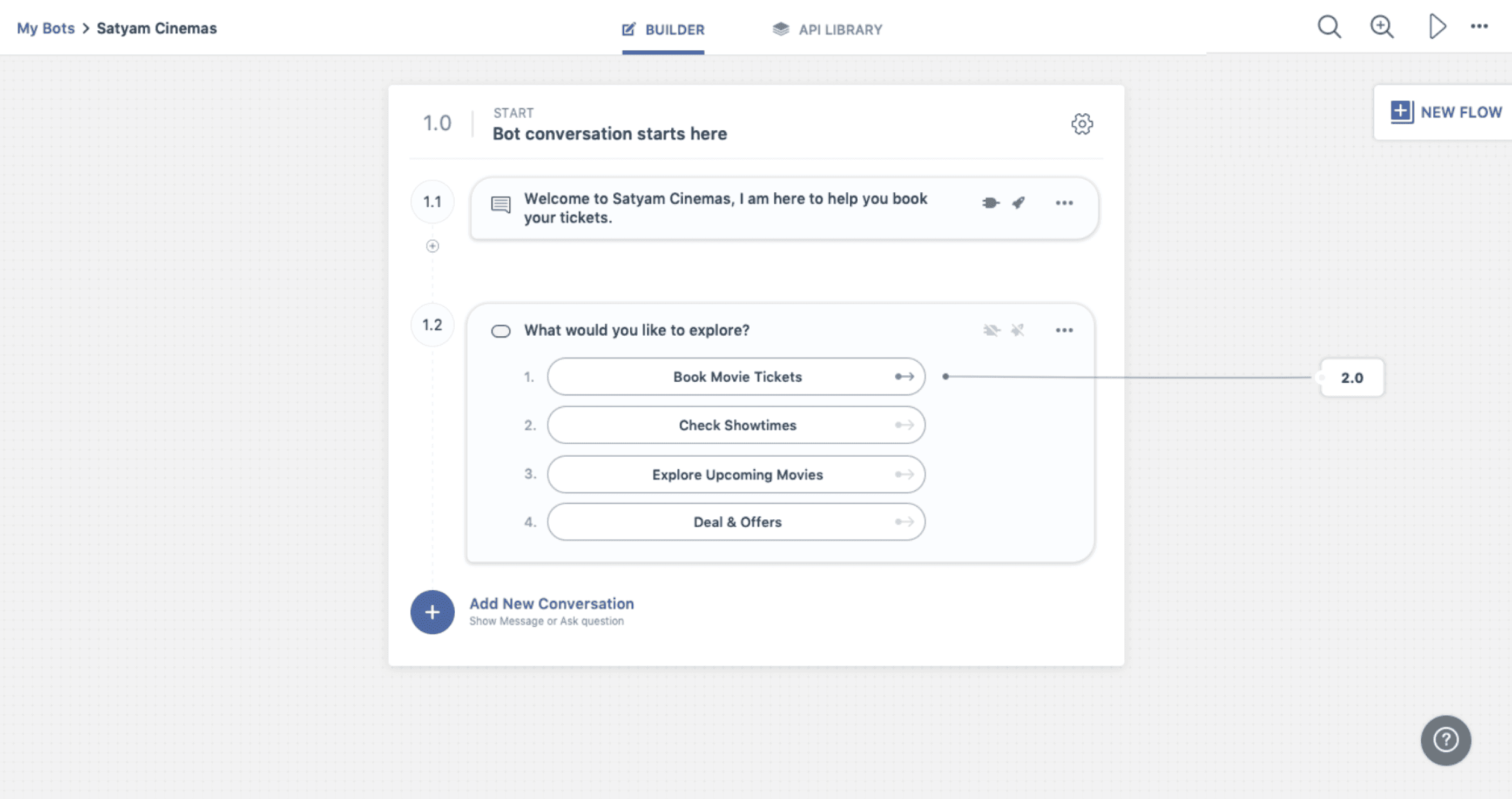

Tooltip showing the hovered state of the forked out flow
Conversation list with content list format.


Showing all the flows linked with hierarchy.
Bot listing page

Once user have few bots configured, they can manage the existing ones or create new ones.
Each bot can have multiple versions, one published, one draft version and multiple archived.
Archived versions can either be active or inactive.
Users can manage multiple versions from here.
Though only one published and one draft version would be possible.

Interactions for bot preview

Showing Welcome message from the bot.
Button selected state

Observations from Cognitive Walkthroughs
30 minutes long user testing sessions were conducted with the six pre-sales representatives, onsite at Freshworks office in Chennai, with the goal to validate if the pre-sales representatives who primarily are the initial point of contacts Freshworks are able to achieve tasks with different use cases such as configuring the bot conversation, linking it to different flows or conversations, configuring and storing the content with APIs and fetching those content wherever required with the newly designed Freshbot builder. All of the users completed the tasks, however, with some difficulties.
Task & Scenario Evaluated
Participants
1
Onboarding
1
Sachin Sandeep V (Presales)
2
Adding First Conversation
2
Madhusudhan Venkatesan (Presales)
3
Fork out a flow
3
Gayathri (Presales)
4
4
Ramya (Presales)
5
Add an action
5
Srinidhi (Presales)
6
Configure API
6
Sandeep (Presales)
Likes
Clean interface.
Layout showing all conversations of the flow in a single view as well all flows in a holistic view.
Creating workflow is much easier.
Dislikes
Making an informed choice between configuring a message/ question is confusing.